VerixaContact sales
Menu

Verixa Desktop AI for Document Automation

Automate order entry. Keep confidential records in-house.

How much time do you spend entering purchase orders, invoices and delivery notes? Verixa Desktop AI for Document Automation reads them inside your company. Your team checks and exports the data without sending customer pricing or transaction details to a public cloud. Small businesses and enterprise teams can get started without developing an AI system themselves.

Contact RiverSoft sales ↗

Keep confidential documents off the public cloud, without building a server room.

01

Process documents in-house with a predictable annual fee

Customer details, pricing and trade terms stay on the company workstation during local processing. Running the local model incurs no cloud model usage charges. The annual IDP license makes software costs easier to budget.

02

128GB unified memory for local AI workloads

Different document layouts and detailed tables need local model capacity. NVIDIA GB10 with 128 GB of unified memory gives the models room to run on a desktop workstation.

03

A desktop workstation for the office

The compact system fits on a desk and runs on a standard office power outlet. No dedicated server room is needed.

Explore NVIDIA GB10 and the DGX Spark reference specifications ↗

The workstation and annual software services

01

Desktop AI workstation | quoted separately

The desktop workstation uses NVIDIA GB10. Its price is separate from the annual software fee. When ordered together, the hardware is tested and the models and IDP software are preinstalled. After activation, use IDP in your browser.

02

Intelligent document processing | One-year core IDP license

Powered byFoxit

IDP reads document numbers, dates, customer details and line items from PDFs, Office files such as Word documents and Excel workbooks, and scans. Check the values beside the originals, make corrections, then export the results or connect to your existing ERP or CRM.

03

Foxit Web PDF Editor | Three-month trial

Edit PDF contracts and quotations in your browser. The annual fee includes a three-month trial. Renew the editor if you need it. Your core IDP license runs independently.

04

Setup guidance, training and one year of technical support

Annual service includes a setup guide and one training session. During the first year, your team can contact remote technical support for help with the application or system.

Help getting started and support when you need it

Test your documents, train the people who use them and get support as document automation becomes part of the working day.

01

Will it work with our documents?

Customers and suppliers use different layouts. We’ll review your typical documents and the fields and line items you need to see whether IDP can capture them.

02

Do we need AI expertise?

Training covers the tasks your team will perform: importing files, checking results and exporting data. No model-building or programming experience is required.

03

Who do we call if we have a problem?

A technical support contact can help with operating questions, unexpected extraction results or a system issue.

Import, extract, review and export

Staff check extracted values rather than retyping documents. Use the reviewed data in Excel or an internal business system.

  1. 01Import everyday documents
    Supported files
    PDFs, Office files (e.g., Word and Excel), and scans
    Typical uses
    Purchase orders, invoices and shipping documents
  2. 02Extract fields and table rows
    Document fields
    Order numbers, dates and customer details
    Line items
    Descriptions, part numbers, quantities and unit prices
  3. 03Review beside the original
    Side-by-side view
    Original document and extracted values
    Review and correct
    Check key fields and correct extraction errors
  4. 04Export for your existing workflow
    Export
    Use the results in Excel or downstream workflows
    System integration
    ERP, CRM and other internal business systems

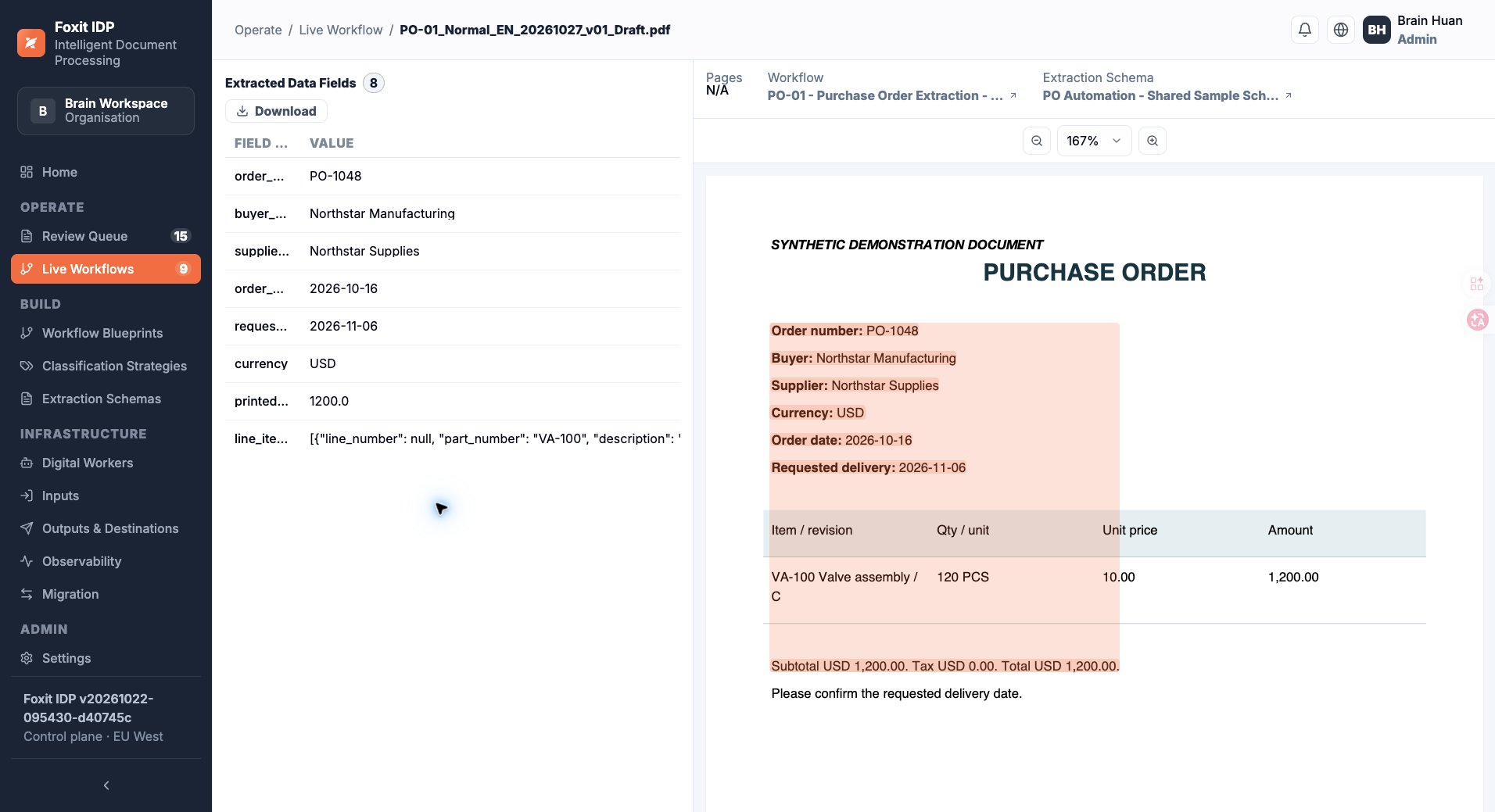
Check extracted values beside the document, on one screen

Enlarge the product screenshot ↗
Foxit IDP purchase order review. The extracted order number, customer, date and line items appear on the left, with the original order on the right.
Foxit IDP purchase order example. Extracted data appears on the left and the source document on the right for review on one screen.

Before purchase

Do we need to replace our ERP or build a new system?

No. IDP can connect to your existing ERP, CRM and other internal systems through an API. Send reviewed data to those systems, or export a file and use it in your current workflow.

Who is the package for?

The standard configuration suits small businesses and enterprise teams that want to capture, check and export data from orders, invoices and delivery notes. Contact us about an enterprise project for custom workflows, deeper integrations or larger deployments. Custom development is outside the standard scope.

How do we request a quotation or walkthrough?

Choose a quote or a demo, then tell RiverSoft sales about your documents, monthly volume and the workflow you want to see. The form simulates submission and offers a downloadable copy.

Does the annual fee include hardware? How do renewals work?

The annual fee covers core IDP and first-line remote technical support for one year. Workstation hardware is quoted separately. The Foxit Web PDF Editor trial lasts three months. Contact sales for regional pricing and renewal terms.

Pricing and delivery terms

Contact sales for pricing in your region. Workstation hardware is quoted separately.

Shipping and activation

When a workstation is purchased, we test the hardware, preload the models and software and check the agreed exports and API interfaces before shipment. We assist with network access and account setup. The quotation specifies the hardware price, model, software versions and delivery terms.

Download the desktop AI solution brief (PDF) ↓

Products and application requirements

Verixa / Desktop Document Automation

Request a quote

Enter your contact details to simulate sending this request to RiverSoft sales. You can also download a copy. No email will be sent.

Document types and monthly volume are optional. You do not need to upload confidential files.